GitHub Integration
Found a bug?
It's a GitHub issue in 30 seconds.
Loupe captures the screenshot, you annotate it, and one click sends a structured GitHub issue — severity, repro steps, screenshot embedded, attributed back to the source. No copy-paste. No Slack thread that dies. No bug that vanishes before someone files it.
The Loupe → GitHub flow, step by step
One feedback item, one menu, one modal, one GitHub issue. Here is the full loop from a captured bug to a tracked issue your team can close.
Step 1 — Capture and annotate the bug. Trigger Loupe from the desktop overlay or the web dashboard, draw a region over the broken element, and drop an annotation. Add a voice note if you want — Loupe transcribes it. The feedback item now has a screenshot, a comment, a severity tag, and repro steps. Everything the developer needs.
Step 2 — Push to GitHub in one click. Open the feedback item menu. Click Push to GitHub. Loupe pre-fills the issue title from the feedback comment. Confirm. Done.
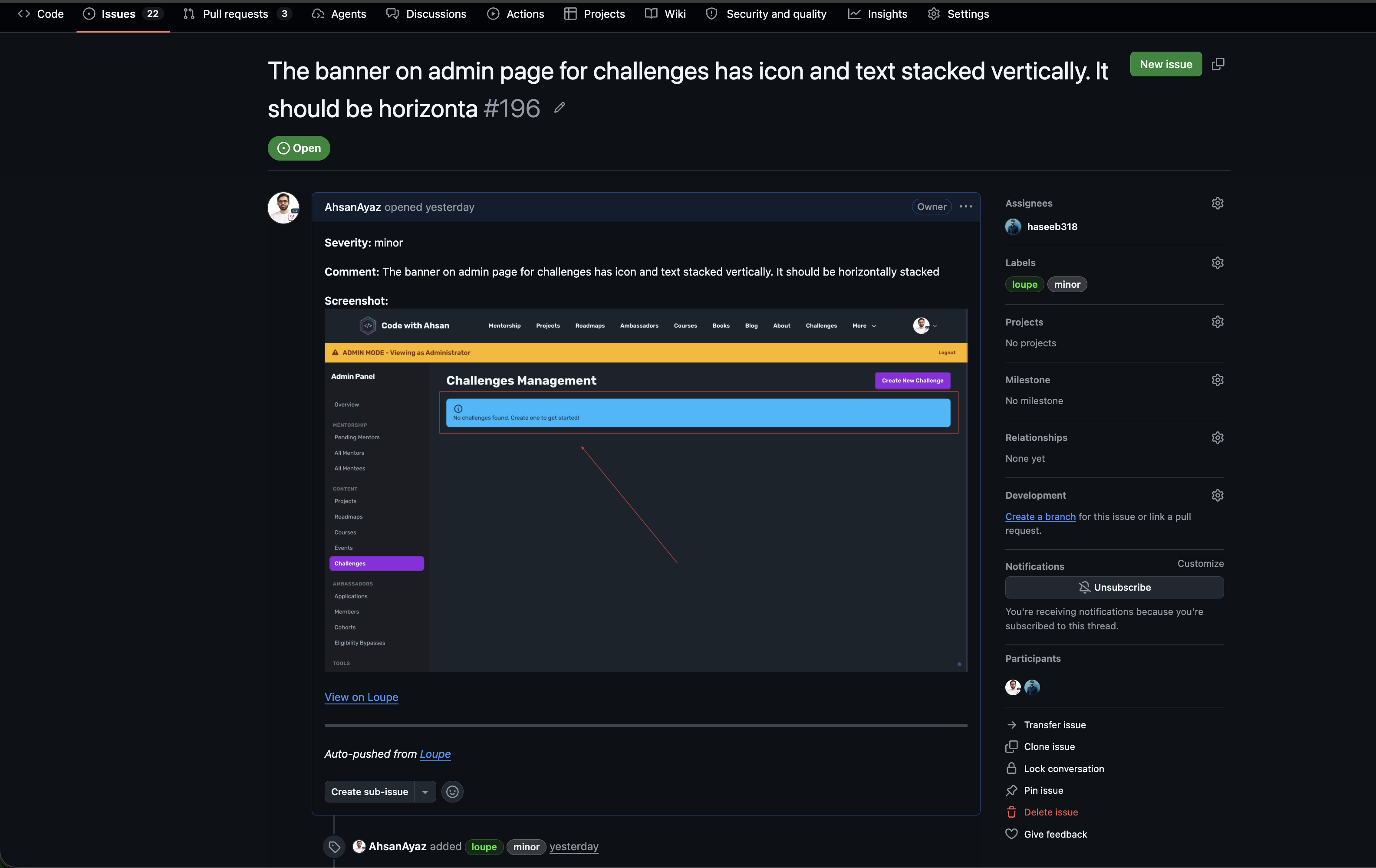
Step 3 — The issue lands in your repo with full context. Severity is a label, not a text guess. Repro steps are structured content, not a wall of prose. The annotated screenshot is embedded in the body — not linked, not attached, right there. There is an attribution line so anyone on the team knows where the report originated.
Step 4 — Loupe marks the feedback as pushed. A GH badge appears on the feedback row the moment the API call lands. The feedback is no longer floating in the inbox. It is a tracked issue with an ID. Click the badge to jump straight to GitHub.
Screenshots above are from a real Loupe project. The GitHub issue layout may look slightly different depending on your repo theme settings.
Why "file a GitHub issue" breaks down at 11pm
You see the bug. You know it needs to be a GitHub issue. Three steps later the context is already leaking out. Three reasons the manual loop fails every time.
The screenshot stays in Slack
You paste it in #bugs, someone says "yeah make a ticket", nobody does. Three days later the screenshot is buried. The issue was never filed.
Copy-paste drops the metadata
Whoever creates the issue retypes the title, guesses the severity, forgets the repro steps, and uploads the screenshot manually. Half the context evaporates in transit.
The bug becomes a thread, not an issue
Without a GitHub issue number, there is no owner, no milestone, no close condition. The bug lives in chat. It can't be assigned. It can't be closed. It just exists.
Loupe vs every other way to land a bug in GitHub
| Feature | Slack screenshot | Manual GH issue | BugHerd / Marker.io | Loupe |
|---|---|---|---|---|
| Screenshot embedded in issue | Manual upload | Web only | ||
| Severity as a real label | Manual | |||
| Repro steps captured at submission | Manual | |||
| Captures desktop apps (not just web) | Web only | |||
| One-click GitHub issue | N/A | |||
| Users can submit feedback via web widget | ||||
| Free tier includes GitHub integration | N/A | N/A |
GitHub is a registered trademark of GitHub, Inc. Comparison reflects native capabilities as of June 2026. BugHerd and Marker.io GitHub integrations require paid plans.
Why Loupe + GitHub works for indie hackers
GitHub Issues is already your tracker. Loupe is the intake layer that gets bugs there with full context — so developers spend zero time reconstructing what happened.
GitHub OAuth, one-click connect
Click connect, authorize the repo, done. No personal access tokens to generate, copy, or rotate. You control access — revoke from GitHub settings any time.
Severity + repro as real GitHub properties
Severity lands as a label. Repro steps land as structured markdown in the body. Your issue list stays filterable. No more "bug: see screenshot" as the entire issue description.
Customer feedback in, GitHub issues out
If you are building a web product, you can embed a feedback widget in your web app using the Loupe Web SDK. Users submit bugs with screenshots. Your team triages them in Loupe. The ones worth shipping go into GitHub as clean, structured issues.
Capture from desktop, web, or both
Native desktop overlay on macOS, Windows, and Linux. Browser widget for your product. The GitHub push is the same single click from either surface — same issue shape, same metadata, same badge on the Loupe row.
Who reaches for Loupe with GitHub
Indie hackers shipping in public
You are solo or a two-person team. GitHub is your tracker. You don't want a $50/month bug tool. Loupe's GitHub integration is free. Capture a bug during a beta session, push it in 10 seconds, ship the fix.
Small teams doing QA
Internal QA captures regressions with screenshots. Support forwards customer reports with voice notes. Everything funnels into Loupe and the ones worth fixing go into GitHub as issues the developer can close.
Founders with a web product
Embed the Loupe SDK on your product. Users report bugs with annotated screenshots. You triage them from the dashboard and push the real ones into GitHub Issues. Your repo stays clean.
Frequently asked questions
How do I push a bug report from Loupe to GitHub Issues?
Open the feedback item in Loupe, click the 3-dot menu, and choose Push to GitHub. Loupe pre-fills the issue title from the feedback comment. Confirm and the issue lands in your repo with severity, repro steps, and the annotated screenshot embedded.
Does the screenshot get embedded in the GitHub issue?
Yes. The annotated screenshot is embedded directly in the issue body. Not linked. Not attached. Right there, so the developer sees the exact bug without leaving the issue.
Can my users submit bugs that go to GitHub Issues?
Yes. Embed the Loupe Web SDK on your product. Users submit feedback with screenshots. Your team triages them in Loupe and pushes the real ones into GitHub Issues. User-submitted noise stays out of your repo until you decide it belongs there.
Which GitHub plan do I need?
Any GitHub plan works, including the free tier. Loupe connects via GitHub OAuth. No personal access tokens to generate or rotate.
Is Loupe's GitHub integration free?
Yes. GitHub Issues integration is on the free tier. No credit card required.
Also on Linear? See the Linear feedback integration for the same push flow on your Linear workspace. Evaluating other tools? See the BugHerd alternative and Usersnap alternative pages. Building a web product and want users to submit bugs directly? Read how to add a feedback widget to your web app.
Stop typing GitHub issues. Push them.
Start free in the browser, connect GitHub in one click, and turn your next bug report into a tracked issue before you have finished writing the Slack message.
Free tier includes GitHub integration. No credit card.